BUILT FOR MAKERS · WINDOWS DESKTOP

From a bright idea.
To a beautiful cut.

Meet LaserStudio. A focused workspace to draw, shape and prepare your next laser project. Made for the things you can't wait to make.

Windows desktop · Free design edition · Paid GRBL plans
Illustration of a laser-cut botanical coaster, a wooden name tag and a layered mountain design
LITTLE IDEAS. REAL POSSIBILITIES.

SEE LASERSTUDIO IN ACTION

From an image.
To editable vectors.

Import your artwork, preview the trace and refine the result. Here, LaserStudio turns the Mountain Workshop image into 80 editable outlines.
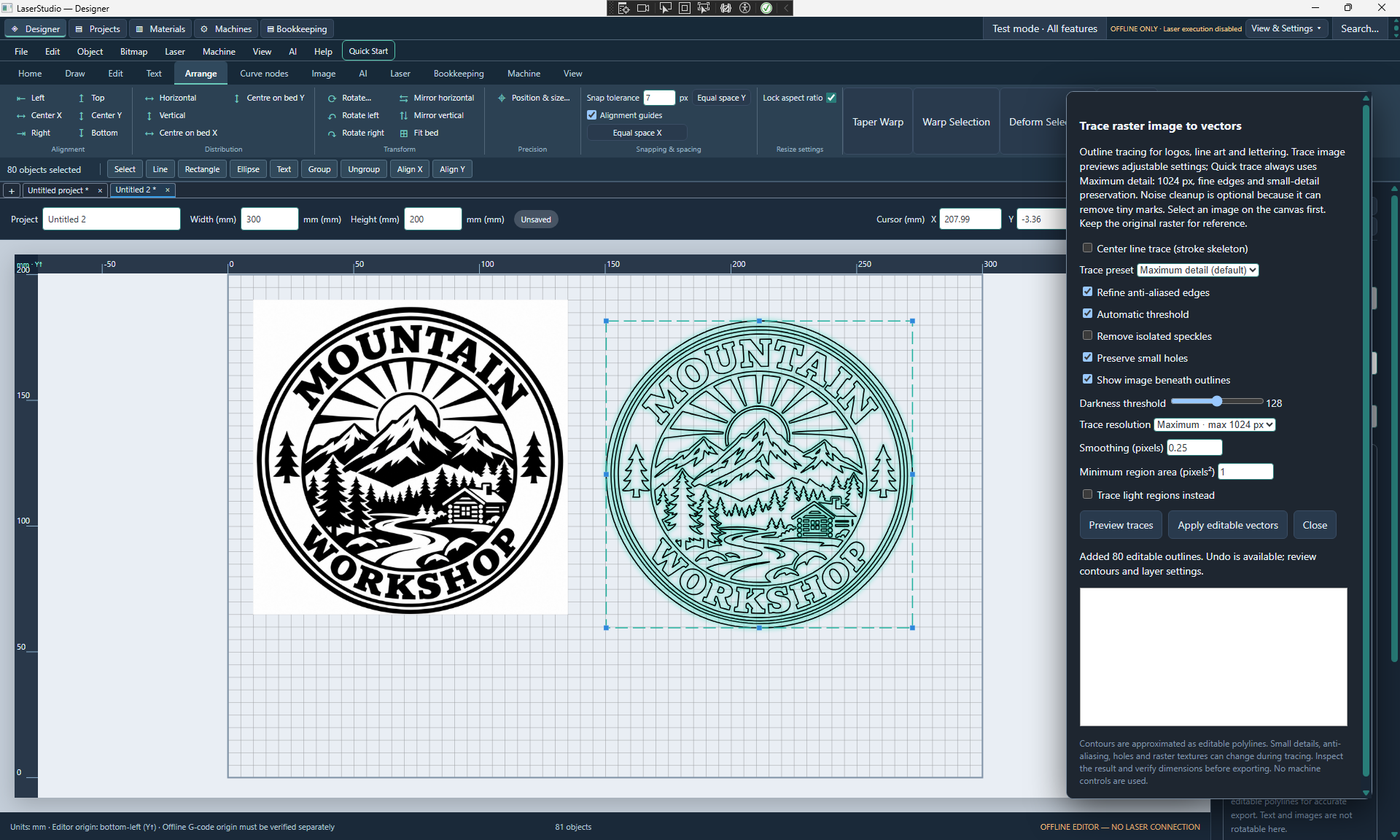
Actual LaserStudio beta: Mountain Workshop bitmap on the left, selected traced vector outlines in the centre, and tracing settings on the rightView full screenshot ↗
Actual LaserStudio beta screenshot · Bitmap artwork on the left, traced vectors on the right. Offline editor; physical laser execution disabled.
01 / DESIGN WITH PRECISION02 / PREPARE WITH CONFIDENCE03 / MAKE IT YOUR OWN

LESS FRICTION. MORE MAKING.

A place for your
next great project.

From your first personalised gift to a collection of products, keep your design tools, materials and projects together.

01 / CREATE
Aa↗

Give your ideas shape.

Draw precise shapes, bend text and work with editable vector designs. Snap to guides to keep every detail in place.

Explore design tools ↗
02 / PREPARE
◇ ◇
◇ ◇ ◇

Make room for more.

Trace artwork, arrange parts and preview the design before the next step. Build a workflow you can repeat.

Explore preparation tools ↗
03 / ORGANISE
PLYWOODACRYLICYOUR NEXT IDEA

Keep the good stuff.

Save projects and bring your materials and machine settings together, ready for the next time inspiration strikes.

Explore your workspace ↗

STRAIGHTFORWARD PRICING

Start free.
Keep creating.

Free design tools, Standard at $50 and Professional at $100. Compare the suggested editions, device limits and optional AI credits.

Compare all three editions ↗

The first hardware target is GRBL-based diode lasers. Confirm your exact controller and firmware with Surfstats before purchasing; other controller families are not promised.

LaserStudio is in beta. The proposed Free edition has no time limit and includes design, project saving and SVG export. Visit Downloads for availability; laser output starts with Standard.

Free has no licence charge. The proposed Standard and Professional plans use a one-time licence price. Suggested paid licences include 12 months of updates and remain usable afterwards. Optional AI usage is paid separately with credit packs.

No. Check your machine setup, material, focus and settings, then perform an appropriate supervised test. The design preview cannot verify physical results.

YOUR NEXT PROJECT STARTS HERE

What will you make?

Meet LaserStudio ↗